This guide describes the current appliance. Availability, vendor features and access depend on your device firmware and Windows policies. Screenshots use the development UI with fictional addresses, users and device names; they contain no customer inventory.
01 Start with scope, time and status #
Record the symptom
Record appliance version, source device model/firmware, affected VLAN/context and approximate observation time. Check whether the issue affects inventory, MACs, addresses, ports or user activity.
Read Settings and source status
Confirm UDT enabled, intended credentials and recent Last poll. Inspect optional controller collection messages and DC errors.
Validate one known endpoint
Compare its MAC with current source-device forwarding/ARP output. Do not assume a zero endpoint count is the same as a denied command.
Preserve evidence
Use the targeted checks below. Do not clear switch MAC tables, flush ARP, delete historical records or restart devices to make the screen appear correct.
| Result | Interpretation |
|---|---|
| Timeout | Route, ACL, listener, transport or source overload. |
| Authorization / access denied | Credentials may authenticate but lack the requested table/context/command rights. |
| Valid empty table | No current entries in that scope; verify traffic and VLAN/context. |
| Unsupported / noSuchObject | Model/firmware/operating mode may not expose the required object. |
| Successful source data but missing UI evidence | Check time, identifier/index mapping and supported output format; collect a sanitized sample for support. |
02 A direct switch has ports but no endpoints #
# Net-SNMP: configure SNMPv3 credentials in an owner-only snmp.conf.
# Do not put authentication/privacy passwords in command history.
# Examples assume authPriv and username udt-reader are configured there.
snmpwalk -v3 -l authPriv -u udt-reader -On -t 3 -r 1 192.0.2.10 1.3.6.1.2.1.2.2.1.2
snmpwalk -v3 -l authPriv -u udt-reader -On -t 3 -r 1 192.0.2.10 1.3.6.1.2.1.17.1.4.1.2
snmpwalk -v3 -l authPriv -u udt-reader -On -t 3 -r 1 192.0.2.10 1.3.6.1.2.1.17.7.1.2.2.1.2
snmpwalk -v3 -l authPriv -u udt-reader -On -t 3 -r 1 192.0.2.1 1.3.6.1.2.1.4.35
# Expected: interface names, bridge-port mappings, learned MACs and neighbours.
# Empty output, noSuchObject and timeout are different results; record which.
Check the bridge-port map and relevant FDB with the appliance’s effective UDT credential. On IOS/IOS-XE, query the actual VLAN context:
snmpwalk -v3 -l authPriv -u udt-reader -n vlan-20 -On -t 3 -r 1 \
  192.0.2.10 1.3.6.1.2.1.17.4.3.1.2
An authorization error suggests a missing context/view grant. A valid empty response needs a known active endpoint and the correct VLAN. No supported bridge table means interface polling alone cannot provide endpoint-to-port tracking. See the Cisco setup example.
03 FortiGate-managed switches or ports are missing #
| What is missing | Check |
|---|---|
| All child inventory | SNMP switch-controller subtree, management scope, FortiOS support and enabled UDT on the parent. |
| Port names / link state | Managed-port SNMP tables and complete instance indexes; do not substitute parent interface inventory. |
| MAC observations only | Enabled NCCM SSH connection, selected UDT SSH credential, correct existing VDOM and fixed diagnostics. |
| Only one child / local port | Stable switch identity and returned local port name; duplicate port numbers are normal across child switches. |
get system arp
diagnose switch-controller switch-info mac-table
diagnose switch-controller mac-cache show
Use release-matched command help for required arguments. A diagnostic denied by the saved account is partial collection, not proof that no endpoints exist. Ask the firewall administrator for a supported restricted diagnostic role; do not change the account to super_admin as a default fix.
04 An endpoint has an IP but no confirmed access port #
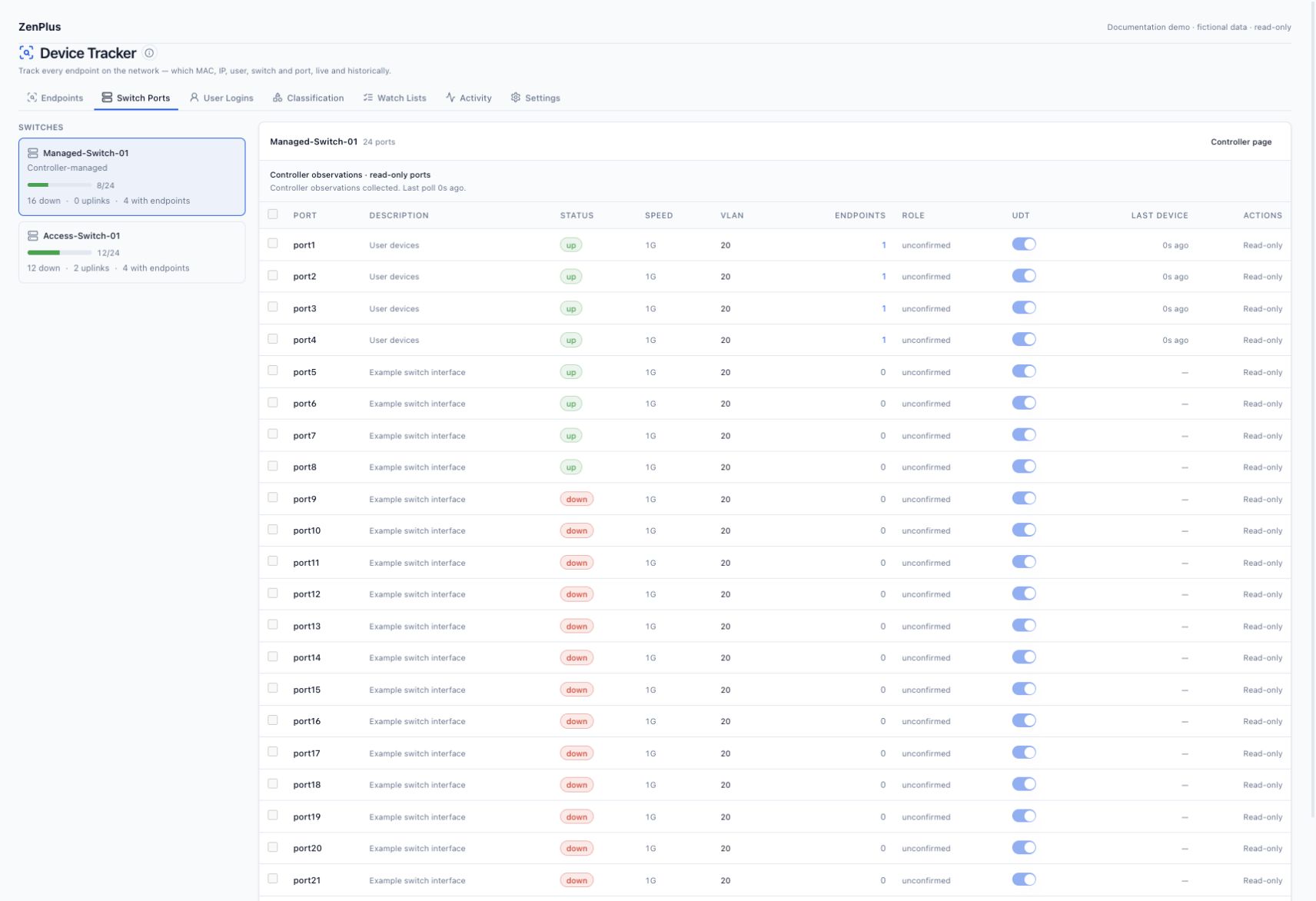
The gateway may know IP→MAC while the downstream switch is unmonitored, its FDB is unavailable, or the only sighting is an uplink/controller observation. Keep the gateway evidence and add/repair the relevant switch source. ARP does not supply a physical access-switch port.
| Gateway operating system | Read-only address check | Scope |
|---|---|---|
| Fortinet FortiOS | get system arp | Actual controller VDOM; managed-switch diagnostics below. |
| Palo Alto PAN-OS | show arp all | Operational read role and relevant context; ARP supplies address evidence, not downstream switch ports. |
| Cisco IOS / IOS-XE / NX-OS | show ip arp | Command-authorized operational read access; IOS VLAN-context access is separate. |
| Cisco ASA | show arp | Read access in the configured firewall context. |
| Arista EOS | show ip arp | Operational read role; verify the intended VRF. |
| Juniper Junos | show arp no-resolve | Operational read class in the configured routing / logical-system context. |
| Aruba AOS-CX / AOS-Switch | show arp | Operational read access and matching interface inventory. |
| Huawei / HPE Comware | display arp | Command-authorized read access and correct routing context. |
Inspect endpoint IP history for the reporter and interface. Overlapping gateways/VRFs, NAT/proxy/shared addresses or recent DHCP reuse can produce conflicting evidence. Compare event time and context; do not manually assign an arbitrary owner.
05 Everything is indirect or unconfirmed #
Controller-managed roles are intentionally unconfirmed in this release. For direct switches, inspect LLDP/CDP and trunk evidence, then determine whether you are seeing only upstream/core switches. Many MACs on an AP or hypervisor port are legitimate. Apply a role override only with confirmed topology; changing an upstream port to access does not create missing downstream evidence.
06 A device shows an old port or address #
Compare Last seen on every attachment and IP reporter. Polling and source-cache aging can delay changes; current attachment state expires after a 15-minute observation gap. Verify a known endpoint has sent normal traffic and that the source is still collecting. A very long polling interval can exceed this active window. Closed history should remain visible.
Address replacement requires repeated recent observations from the same evidence key. An unresolved conflict can remain visible instead of replacing ownership immediately. Check history and source timestamps before concluding that retention caused the discrepancy.
07 The vendor is Unknown #
Check whether the MAC is locally administered/randomized. Its prefix does not reliably identify the hardware manufacturer. Use a documented manual type or classification rule where you have inventory evidence. A vendor label is not a physical switch-location source.
08 Rogue count is zero or unexpectedly high #
Rogue detection requires an enabled allow policy. With no allow rule, an empty rogue count is expected. With rules, inspect their scope and match types, ignored endpoints and whether the endpoint is recent. Review legitimate exceptions before enabling alert delivery. Do not add a universal allow rule merely to hide unexpected devices.
09 No Microsoft user activity or no device link #
| Stage | Read-only test / expected evidence |
|---|---|
| Transport | Validate TCP listener, FQDN/certificate trust and the permitted appliance source. |
| Authentication | Correct separate username/domain fields; account not expired/locked; supported NTLM/Kerberos policy. |
| Execution / log read | Test Windows Shell as the dedicated service account, then query Security events; group membership alone is insufficient. |
| Audit / event volume | Success enabled for Logon and both Kerberos categories; recent events exist and logs do not roll before collection catches up. |
| Filtering | Machine names ending in $ and failed/system events are excluded from new user activity. |
| Correlation | A valid client IP has exactly one endpoint candidate at the event time; ambiguous records remain unassigned. |
| Appliance authorization | Viewer has udt.view_users or udt.manage. Inventory-only access is not a Windows collection failure. |
# Read-only checks on each selected DC, using an administrator for inspection.
Get-Service WinRM
winrm enumerate winrm/config/listener
winrm get winrm/config/winrs
Get-Item WSMan:\localhost\Service\RootSDDL
winrm get winrm/config/plugin?Name=Microsoft.Windows.Shell
wevtutil gl Security
# Expect a listener, AllowRemoteShellAccess=true and the intended read/execute ACLs.
# Inspect effective GPO if these settings show policy overrides.
# From a domain-joined Windows validation host, under the service-account identity.
# runas prompts for the password; never supply it as a command-line argument.
runas /netonly /user:EXAMPLE\svc-zenplus-udt cmd
# In the resulting command window, exercise the Windows Shell provider:
winrs /r:https://dc01.example.test:5986 /noprofile powershell.exe -NoProfile -NonInteractive -Command "Get-WinEvent -FilterHashtable @{LogName='Security';Id=4624,4768,4769;StartTime=(Get-Date).AddMinutes(-30)} -MaxEvents 5 | Select-Object TimeCreated,Id,RecordId"
# Also run the appliance's Poll now using the stored Windows credential.
# A WinRM listener probe or Test-WSMan alone does not test the event-read shell.Use the full Microsoft service-account guide for setup commands, audit policy and certificate requirements. A successful Test-WSMan / listener probe alone does not prove Security-read shell access. Never fix access denied by granting Domain Admin or turning off encryption/certificate checks.
10 More endpoints than physical devices #
Inventory contains MAC identities, including historical interfaces, phones, virtual machines, roaming and randomized addresses. One physical device can have several MACs; one uplink can see many identities. Use Active and the appropriate source/port filter before comparing with an asset count. Do not delete history just to make counts match.
11 Collection is slow or data is delayed #
Compare elapsed collection time with the interval, timeout/error rates and source event volume. Start from 300 seconds and tune selected sources, rather than globally polling every source at the minimum. Verify remote-device CPU and network loss. For DCs, the 500-event oldest-first batch must keep up with matching events; increase measured collection capacity or shorten selected intervals while retaining enough Security-log history.
Use paginated/filtered endpoint lists and targeted port drilldown. If source data is fresh but UI queries are slow, record page/filter, appliance version and timings without exporting the whole database.
12 Provide a safe support case #
Include version, vendor/model/firmware, context/VLAN, collection result, timestamp/timezone, expected versus observed behavior and a minimal sanitized command sample. Replace customer names, usernames, addresses, MACs and serials consistently with fictional values while preserving index/port relationships. Never include passwords, SNMP communities, private keys, tokens or complete configuration backups.