This guide describes the current appliance. Availability, vendor features and access depend on your device firmware and Windows policies. Screenshots use the development UI with fictional addresses, users and device names; they contain no customer inventory.
01 Use types to organize investigation #
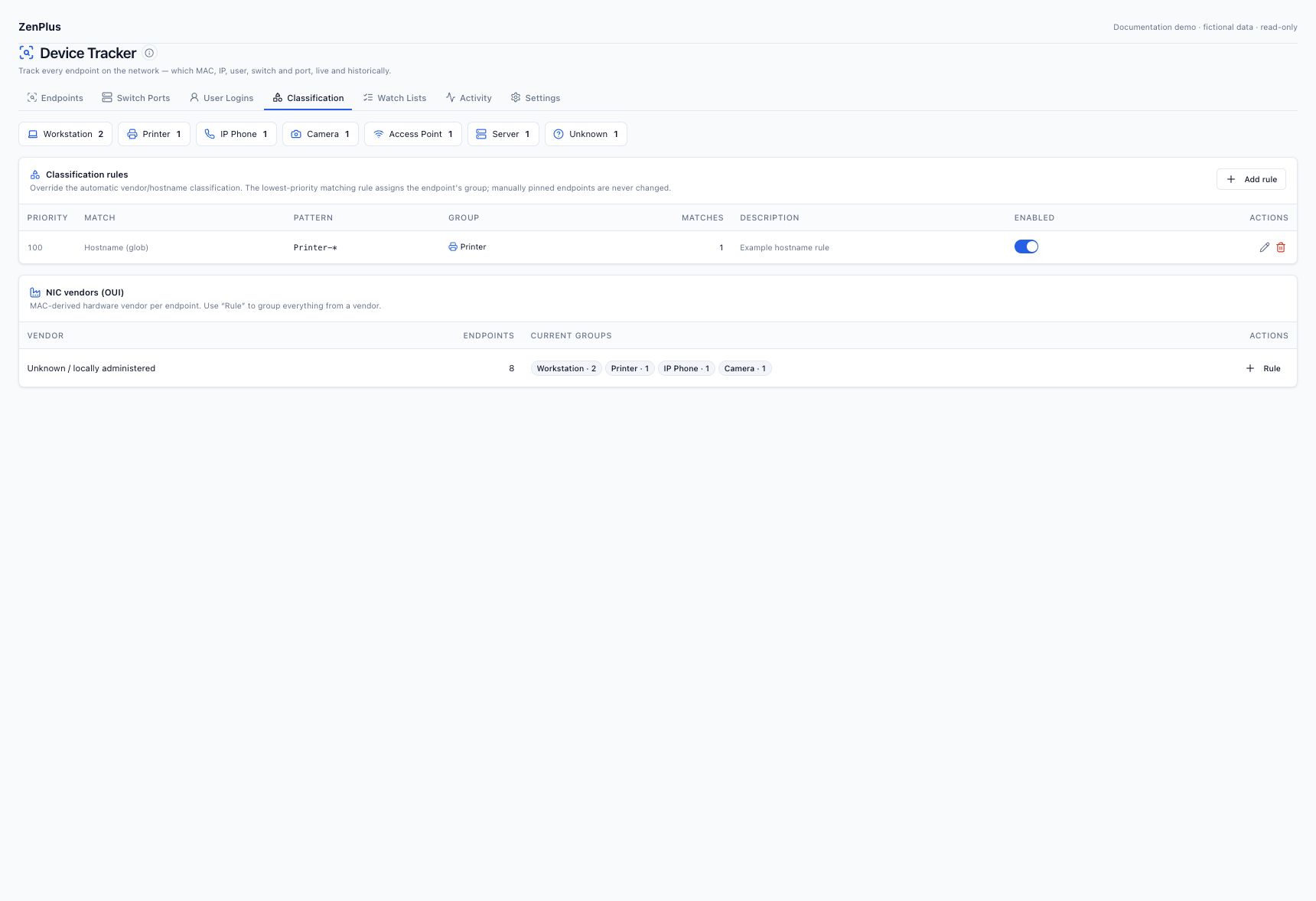
Classification helps operators filter workstations, servers, phones, printers, access points, cameras, virtual interfaces, network devices, IoT and unknown endpoints. A type is an inventory aid, not proof of identity, authorization or physical location.
02 Separate vendor evidence from endpoint type #
Automatic classification uses available vendor/hostname signals. A NIC manufacturer can supply interfaces for several device classes, so vendor alone is not a complete asset classification. A locally administered MAC has no reliable manufacturer prefix; leave its vendor unknown and use verified hostname or inventory information for its type.
03 Understand rule and manual precedence #
| Priority | Source | Behavior |
|---|---|---|
| Highest | Manual | A type pinned on endpoint detail is preserved until returned to Auto. |
| Next | Rule | The lowest numeric priority matching enabled rule wins; more specific exceptions should come first. |
| Fallback | Automatic | Available vendor/hostname heuristics apply when no manual choice or rule establishes the type. |
After editing a rule, inspect its match count and a known example endpoint. A manual pin can explain why a matching rule did not change that endpoint.
04 Create and verify a classification rule #
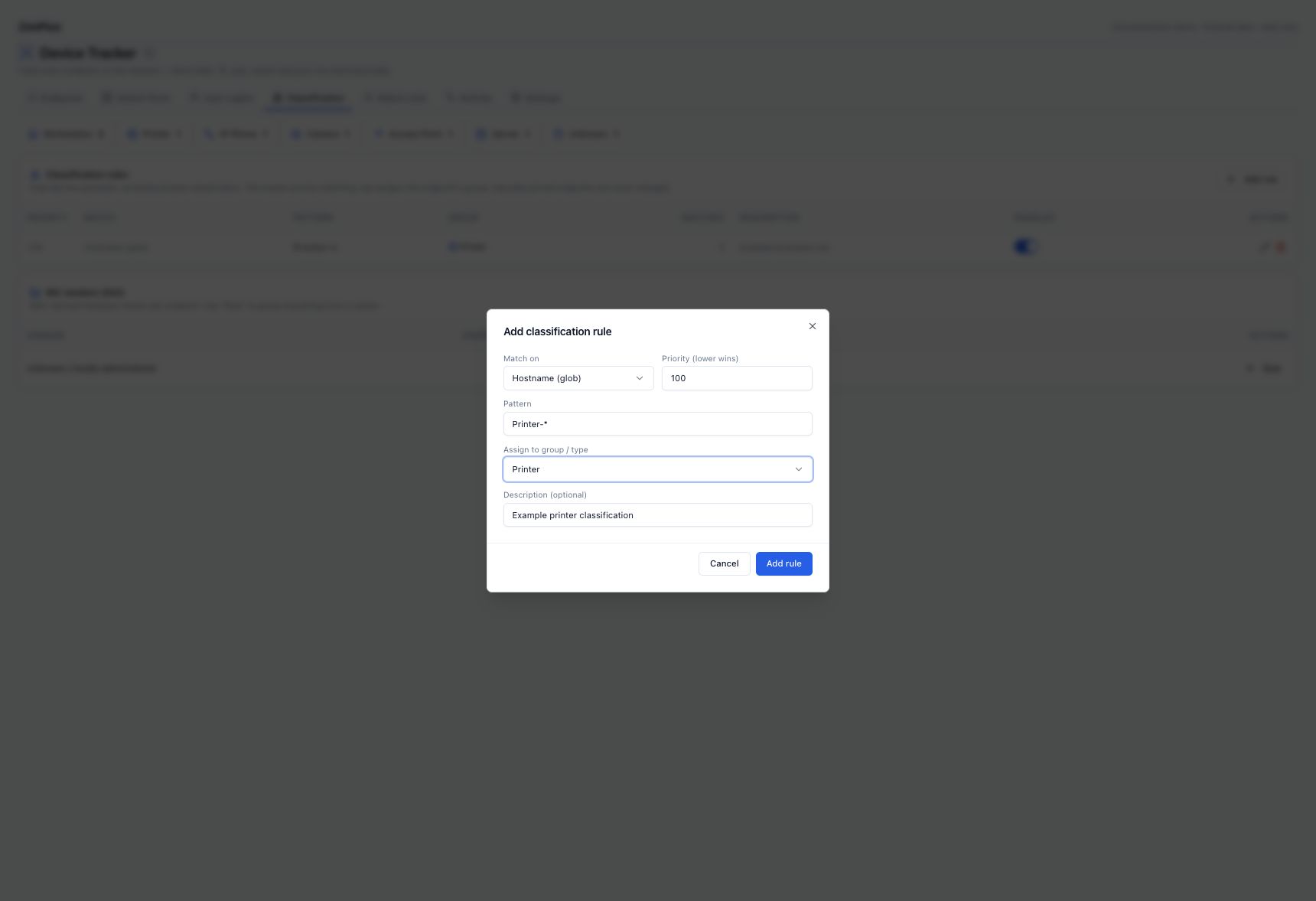
Open Classification → Add rule
Select the match type supported by your evidence. Examples include MAC, MAC prefix, hostname glob, address/range/subnet, vendor and user.
Enter a precise example
For a known printer naming convention, choose Hostname (glob), pattern Printer-*, priority 100 and group/type Printer. Record a useful description.
Save and inspect matches
Use the resulting match count and open a known endpoint to confirm its type/source. Review broader patterns and pinned types before expanding scope.
Keep authorization separate
A printer type does not automatically make the endpoint allowed. Define approval in Watch Lists using the appropriate policy evidence.
05 Use vendor rollups carefully #
The NIC vendor table summarizes known OUI vendors and current groups. A vendor-based rule can be useful for a homogeneous device family, but do not apply one to an unknown/random-MAC bucket to invent hardware identity. Validate sample endpoints before treating a whole manufacturer as one asset class.
06 Create a custom group #
In a rule’s group/type selector, choose New custom group and enter a lowercase slug such as door-access or test-lab. Slugs use letters, digits, hyphens or underscores, up to 30 characters, starting with a letter or digit. Save a scoped rule, then verify its count and endpoint filter.
07 Troubleshoot unknown classification #
| Observation | Likely explanation | Next action |
|---|---|---|
| Some randomized MACs have no vendor | No reliable globally assigned prefix. | Use verified hostname/manual inventory evidence; keep vendor unknown. |
| Normal global MACs have no vendor | OUI data unavailable, outdated or not matched. | Check the appliance’s OUI refresh/connectivity support; request a supported offline data option if required. |
| Rule has zero matches | Pattern/type/scope differs from observed evidence. | Check one actual endpoint and the supported match format. |
| Rule matches but endpoint remains unchanged | Manual type pin or a higher-priority rule. | Inspect type source and rule ordering; return to Auto only when intended. |