This guide describes the current appliance. Availability, vendor features and access depend on your device firmware and Windows policies. Screenshots use the development UI with fictional addresses, users and device names; they contain no customer inventory.
01 Plan access before enabling collection #
| Capability | Minimum permission | Not required |
|---|---|---|
| Endpoint and port discovery | SNMP read view on the relevant interface, forwarding and neighbour tables; appliance-source ACL. | SNMP write, network configuration changes. |
| Supplemental gateway / controller evidence | Optional SSH operational read commands in the actual routing/controller context. | Configuration backup account replacement, blanket administrator access. |
| Windows Security events | Dedicated domain user with Security-channel read rights, plus WinRM remote-shell execution rights on selected DCs. | Domain Admin, Enterprise Admin, AD writes or permission to clear logs. |
| Appliance inventory access | udt.view. | Access to user activity. |
| Usernames and login activity | udt.view_users or udt.manage. | Sharing user activity with every inventory viewer. |
| Configuration / port actions | udt.manage; direct-switch actions additionally require a deliberately provisioned write-capable SNMP credential. | Write access for normal discovery; controller-child port actions. |
| Connection | Source → destination | Scope |
|---|---|---|
| UDP 161 | Appliance → selected switches and gateways | SNMPv3 authPriv preferred; source-IP ACL and restricted read view. |
| TCP 22 (optional) | Appliance → selected gateway / controller | Saved SSH credential authorized for the documented read commands only where platform roles permit. |
| TCP 5986 (preferred) | Appliance → selected DCs | WinRM HTTPS with a trusted server certificate. |
| TCP 5985 (alternative) | Appliance → selected DCs | Approved NTLM / Kerberos with message encryption; Basic over HTTP is not accepted. |
| DNS / time services | Appliance → approved infrastructure | Name resolution, certificate hostname checks and reliable timestamps. |
All addresses in this guide are documentation examples. Replace them with approved management addresses; do not copy credentials from a production device into a public ticket.
02 Allow the required SNMP objects #
| Object / subtree | OID | Purpose |
|---|---|---|
| IF-MIB / ifXTable | 1.3.6.1.2.1.2, 1.3.6.1.2.1.31 | Interface identity, status, alias and speed. |
| Bridge port → ifIndex | 1.3.6.1.2.1.17.1.4.1.2 | Required to resolve bridge ports to interfaces. |
| VLAN-aware FDB | 1.3.6.1.2.1.17.7.1.2.2.1.2 | Preferred MAC → bridge-port observations. FDB ID is not necessarily VLAN ID. |
| FDB ID → VLAN | 1.3.6.1.2.1.17.7.1.4.2.1.3 | Maps forwarding databases to VLANs; ambiguous mappings remain unknown. |
| Classic FDB | 1.3.6.1.2.1.17.4.3.1.2 | Fallback MAC → bridge port. |
| VLAN names / native VLAN | 1.3.6.1.2.1.17.7.1.4.3.1.1, 1.3.6.1.2.1.17.7.1.4.5.1.1 | Optional VLAN labels and PVID. |
| IPv4 ARP / IPv4–IPv6 neighbours | 1.3.6.1.2.1.4.22, 1.3.6.1.2.1.4.35 | Gateway IP → MAC and reporter interface. |
| LLDP / Cisco CDP | 1.0.8802.1.1.2, 1.3.6.1.4.1.9.9.23 | Topology and uplink evidence. |
| Cisco VLAN / trunk inventory | 1.3.6.1.4.1.9.9.46 | VLAN contexts and trunk evidence, where supported. |
| FortiGate switch-controller / VDOM tables | 1.3.6.1.4.1.12356.101.24, 1.3.6.1.4.1.12356.101.3.2.1.1.2 | Managed identities, local port inventory / link status and controller context. |
# Net-SNMP: configure SNMPv3 credentials in an owner-only snmp.conf.
# Do not put authentication/privacy passwords in command history.
# Examples assume authPriv and username udt-reader are configured there.
snmpwalk -v3 -l authPriv -u udt-reader -On -t 3 -r 1 192.0.2.10 1.3.6.1.2.1.2.2.1.2
snmpwalk -v3 -l authPriv -u udt-reader -On -t 3 -r 1 192.0.2.10 1.3.6.1.2.1.17.1.4.1.2
snmpwalk -v3 -l authPriv -u udt-reader -On -t 3 -r 1 192.0.2.10 1.3.6.1.2.1.17.7.1.2.2.1.2
snmpwalk -v3 -l authPriv -u udt-reader -On -t 3 -r 1 192.0.2.1 1.3.6.1.2.1.4.35
# Expected: interface names, bridge-port mappings, learned MACs and neighbours.
# Empty output, noSuchObject and timeout are different results; record which.
Use a read view containing these objects, without a write view. For a restricted view, include the full related tables needed to resolve indexes—not only a single displayed column. The standard Q-BRIDGE specification explains the FDB-to-VLAN relationship.
03 Cisco IOS / IOS-XE VLAN contexts #
Many IOS / IOS-XE access switches expose bridge forwarding tables per VLAN. Interface polling can succeed while MAC collection fails. SNMPv3 access must include both the default context and the appropriate vlan-<id> contexts. On releases supporting prefix matching, an administrator can apply this scoped read-only example; confirm syntax and algorithm support for the specific firmware.
! Configuration example: apply through your approved device-change process.
ip access-list standard UDT-SOURCE
 permit host 192.0.2.20
!
snmp-server view UDT-READ 1.3.6.1.2.1.1 included
snmp-server view UDT-READ 1.3.6.1.2.1.2 included
snmp-server view UDT-READ 1.3.6.1.2.1.31 included
snmp-server view UDT-READ 1.3.6.1.2.1.17 included
snmp-server view UDT-READ 1.3.6.1.2.1.4 included
snmp-server view UDT-READ 1.3.6.1.4.1.9.9.23 included
snmp-server view UDT-READ 1.3.6.1.4.1.9.9.46 included
snmp-server view UDT-READ 1.0.8802.1.1.2 included
snmp-server group UDT-GROUP v3 priv read UDT-READ access UDT-SOURCE
snmp-server group UDT-GROUP v3 priv context vlan- match prefix read UDT-READ access UDT-SOURCE
! Example algorithm syntax; use the strongest jointly supported options.
! Replace placeholders privately through approved credential provisioning.
snmp-server user udt-reader UDT-GROUP v3 auth sha <AUTH_SECRET> priv aes 128 <PRIV_SECRET>
! No write view is granted.
# With the same protected SNMPv3 configuration used above:
snmpwalk -v3 -l authPriv -u udt-reader -n vlan-20 -On -t 3 -r 1 \
192.0.2.10 1.3.6.1.2.1.17.1.4.1.2
snmpwalk -v3 -l authPriv -u udt-reader -n vlan-20 -On -t 3 -r 1 \
192.0.2.10 1.3.6.1.2.1.17.4.3.1.2Expected: bridge port mappings and learned MAC rows for VLAN 20. An authorization error means context/view access is denied; an empty valid table can mean no MACs were learned. For approved legacy v2c deployments, IOS community indexing uses <community>@20; configure the indexed value privately rather than exposing it in shell history. Other Cisco families and software releases may use a different layout; verify their actual Q-BRIDGE/BRIDGE output. See Cisco’s VLAN-context configuration reference.
04 Other switches: validate the tables, not the brand #
Aruba, Juniper, Arista, Extreme, Huawei / Comware and standalone FortiSwitch models commonly expose standard bridge objects, but exact coverage varies by model, operating mode and firmware. Start with the same interface, bridge map and Q-BRIDGE walks. If Q-BRIDGE is unavailable, check classic BRIDGE-MIB. A cloud-only inventory or an interface-only SNMP implementation does not establish endpoint-to-port tracking.
A returned forwarding table plus a usable port map is the acceptance criterion. Do not assume every product in a vendor family implements those tables. This collector does not request a cloud vendor API or automatically discover hidden VRFs / VSYS / logical systems.
05 Fortinet controller-managed switches #
Collect the managing FortiGate
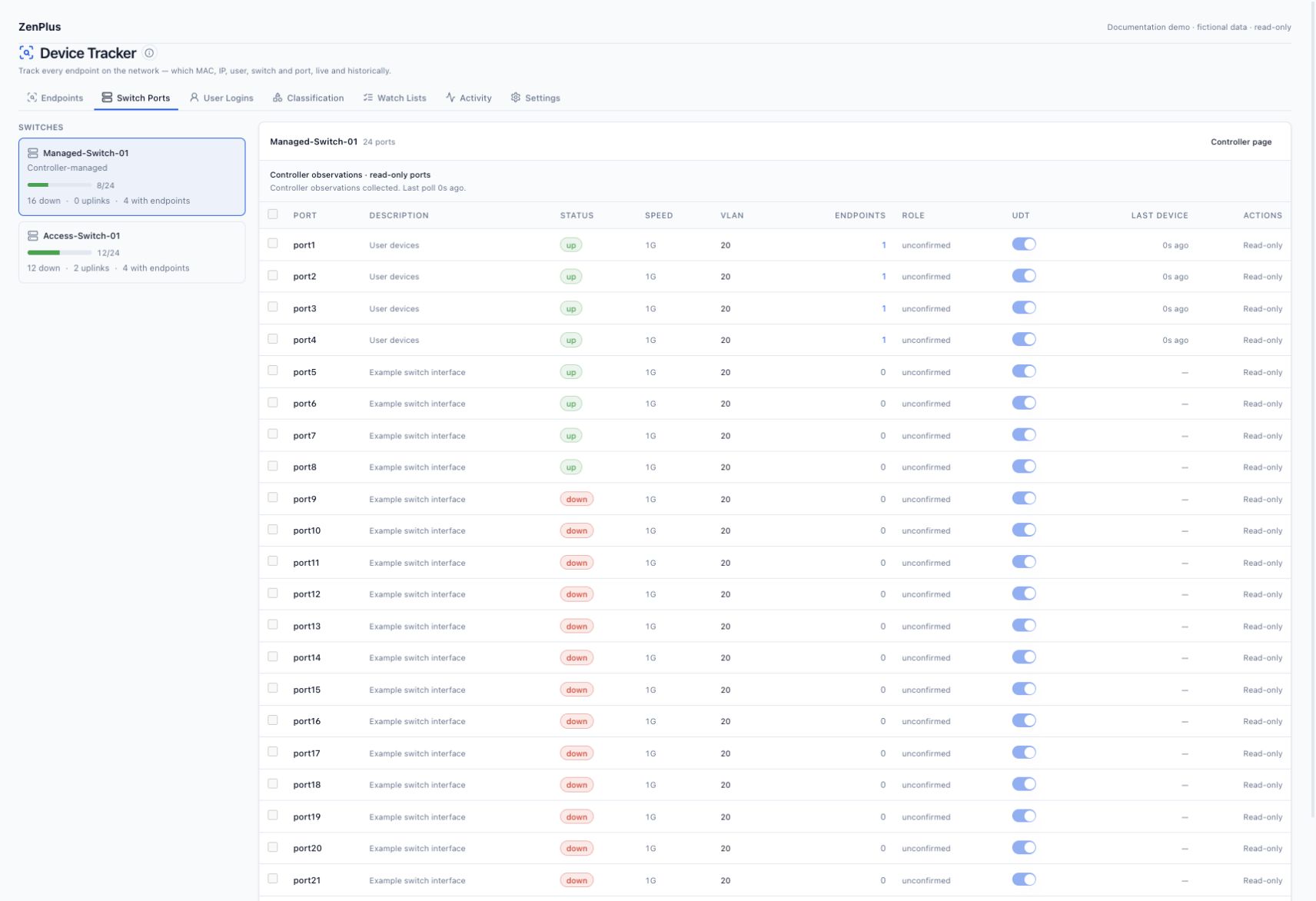
Add the firewall as a monitored SNMP device and enable UDT. Read its switch-controller and VDOM tables. The resulting child switches appear in Switch Ports; they need not be enrolled as separate monitored devices.
Provide read diagnostics if MAC evidence is missing
Configure an enabled NCCM SSH connection for the controller. In UDT Settings, choose a diagnostic-capable Read-only CLI credential override if the normal account cannot run the commands. This selection does not replace the configuration-backup credential.
Verify the real controller context
Use the configured VDOM that manages the switches. The collector may select existing global / VDOM contexts, then reads fixed diagnostics. Never create or change a VDOM merely to test UDT.
Verify inventory and MAC locations
Compare one switch identity, a local port name and a known endpoint MAC with SNMP/CLI output. Confirm a recent successful collection status and distinguish read-only controller observations from directly polled ports.
# Read-only FortiOS diagnostics; run in the relevant existing context.
get system arp
diagnose switch-controller switch-info mac-table
diagnose switch-controller mac-cache show
# Command arguments / availability vary by FortiOS release.
# Consult CLI help and the release-matched reference for switch-specific forms.
Context selection such as config global and execute enter <existing-vdom> changes the session context; it is not a request to write configuration. The account needs access to that context and the diagnostic commands. Some FortiOS releases bundle diagnostic permission broadly: review a supported restricted profile with the firewall administrator rather than granting super_admin by default. See Fortinet switch MIBs and managed-switch CLI diagnostics.
06 Gateway address evidence and vendor read commands #
Collect the routing device for each tracked VLAN. SNMP neighbours are preferred; the optional enabled SSH connection can supplement missing IPv4 ARP. Use the command appropriate to the actual device operating system and exposed routing context.
| Platform | Supplemental read command | Permission / scope |
|---|---|---|
| Fortinet FortiOS | get system arp | Actual controller VDOM; managed-switch diagnostics below. |
| Palo Alto PAN-OS | show arp all | Operational read role and relevant context; ARP supplies address evidence, not downstream switch ports. |
| Cisco IOS / IOS-XE / NX-OS | show ip arp | Command-authorized operational read access; IOS VLAN-context access is separate. |
| Cisco ASA | show arp | Read access in the configured firewall context. |
| Arista EOS | show ip arp | Operational read role; verify the intended VRF. |
| Juniper Junos | show arp no-resolve | Operational read class in the configured routing / logical-system context. |
| Aruba AOS-CX / AOS-Switch | show arp | Operational read access and matching interface inventory. |
| Huawei / HPE Comware | display arp | Command-authorized read access and correct routing context. |
A gateway can provide useful IP/MAC evidence with no downstream switch port. To obtain a physical-port observation, also collect the access switch or its supported controller. Incomplete neighbours, zero/multicast MACs and unresolved interfaces do not become valid attachments. Nondefault routing contexts must be explicitly exposed; the collector does not guess them.
07 Configure the appliance step by step #
Store the network credential
Open Administration → Credentials → SNMP. Add the approved SNMPv3 user, security level and matching algorithms. Add selected devices through Devices or Discovery and assign the credential.
Open Device Tracker Settings
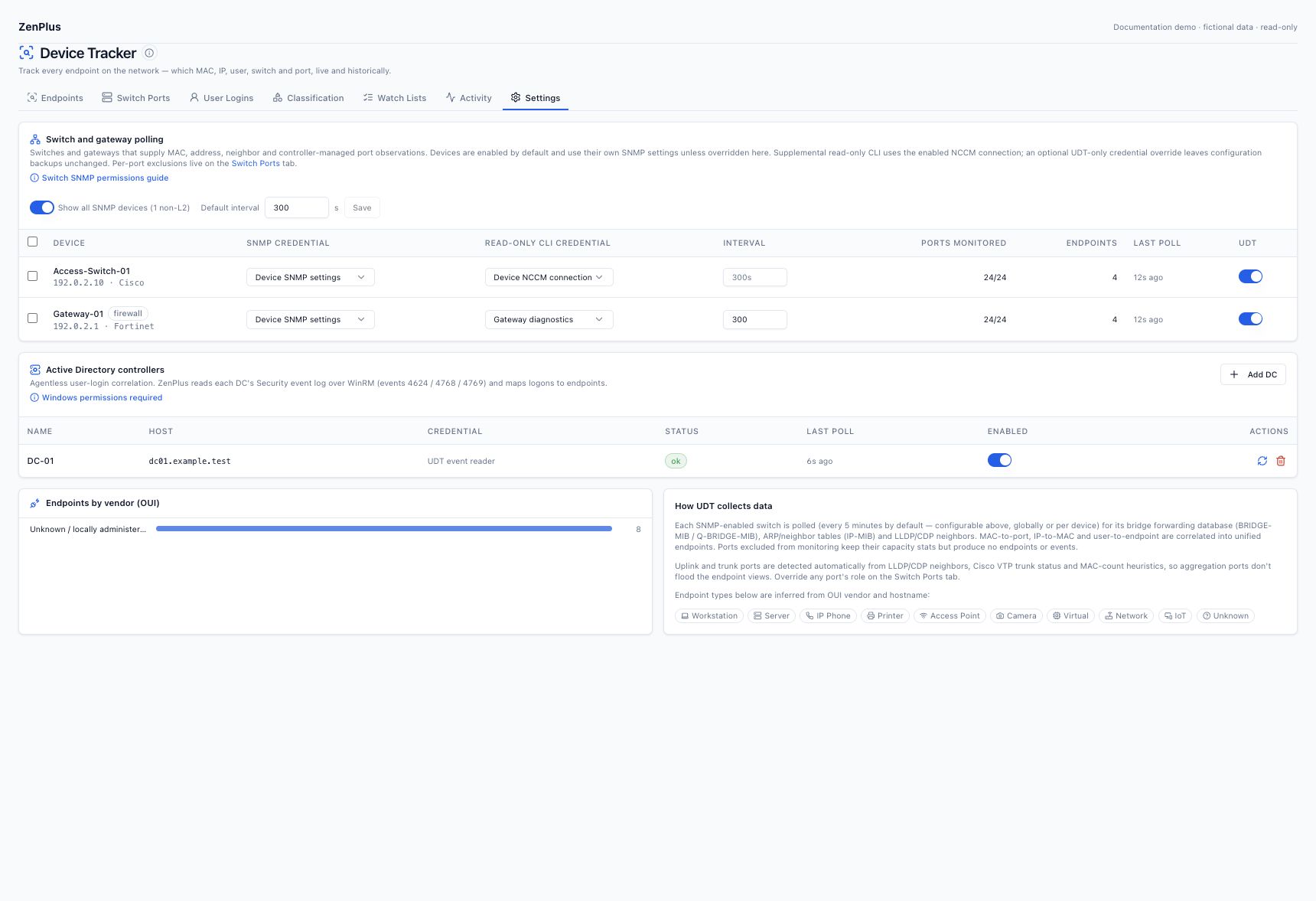
Enable UDT on each selected source. Use Show all SNMP devices to include gateways. An inherited device credential is displayed as Device SNMP settings.
Set overrides only where needed
Use a UDT SNMP override for different bridge-table rights. Use the Read-only CLI credential override for supplemental controller/gateway reads, with the enabled SSH connection kept on the device.
Begin with 300 seconds
The global interval defaults to five minutes; an empty per-device interval inherits it. Per-device intervals are bounded to 60–86400 seconds. Tune selected sources after checking collection duration and failures.
Observe two cycles
Check Ports monitored, Endpoints and Last poll. Open Switch Ports, select the desired switch and click a nonzero endpoint count. The filtered list must show that switch and port in its scope banner.
08 Read-only acceptance checklist #
| Check | Expected result | If missing |
|---|---|---|
| Interface and bridge map | Port names and valid bridge-port→ifIndex mappings. | Check the view and supported MIBs. |
| Known test MAC | Fresh forwarding/controller observation on the expected local port. | Check traffic, VLAN context, command access and output format. |
| Known test IP | Correct MAC association with a named reporting gateway/interface. | Check routing source, neighbour table and address conflict evidence. |
| Port drilldown | Switch/port scope banner and only relevant active observations. | Confirm you selected the intended direct or controller child switch. |
| Collection status | Recent successful / explainable partial status. | A denied command is not proof that the network is empty. |
Save model/firmware, collection timestamp and a sanitized sample if source output is valid but the UI differs. Do not clear ARP/FDB caches, restart devices or delete UDT history as an acceptance test.
09 Microsoft account: minimum rights #
Windows login tracking requires a dedicated nonadministrative on-premises AD DS account with Security-event read access and WinRM shell execution on selected DCs. Event Log Readers and Remote Management Users are common grants, but hardened ACLs/GPOs can still deny the shell or Security channel. A Microsoft 365 / Entra account alone does not provide DC Security-log access.
Follow the complete Microsoft account, audit policy and HTTPS setup procedure before storing the Windows credential. No Domain Admin membership is required for the collector.
10 Add and validate a domain controller #
Save the Windows credential
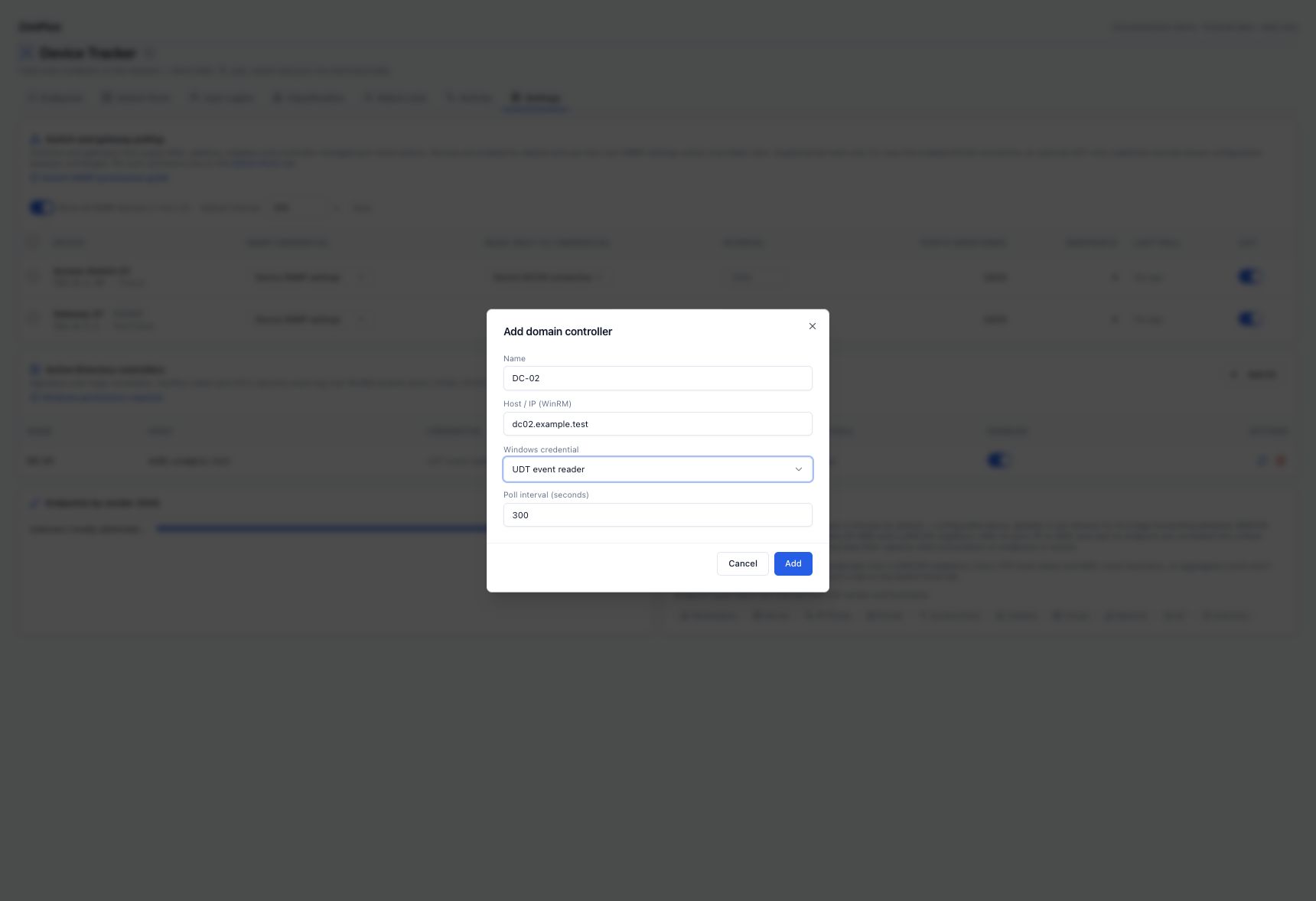
Use Administration → Credentials → Windows. Username: svc-zenplus-udt; Domain: EXAMPLE. Enter the password privately. Prefer NTLM over HTTPS, port 5986, with trusted certificates.
Add the controller
Under Device Tracker → Settings → Active Directory controllers, choose Add DC. Enter DC-01, dc01.example.test, the saved credential and an initial 300-second interval. Use the FQDN covered by the certificate.
Run Poll now
Verify the controller row changes to a successful status and Last poll is recent. A successful connection with no matching events is different from an authentication or execution error.
Validate a real test event
From an approved test workstation, produce a normal domain authentication. Compare its DC event, client IP and timestamp with User Logins and the endpoint’s historical address evidence.
11 Keep port control separate from discovery #
Ordinary UDT collection is read-only. Administrative disable/enable actions on a directly polled switch require udt.manage plus write-capable SNMP access, and are confirmed and audited. They can disconnect users, servers and uplinks; enable them only under your change policy. Controller-managed child ports are always read-only in this release. Their local port numbers must never be treated as parent-firewall interface indexes.